Build 11.1.0.0
Released Sep 29th, 2026 . Requires maintenance through Sep 26th, 2026
PDF-XChange Editor
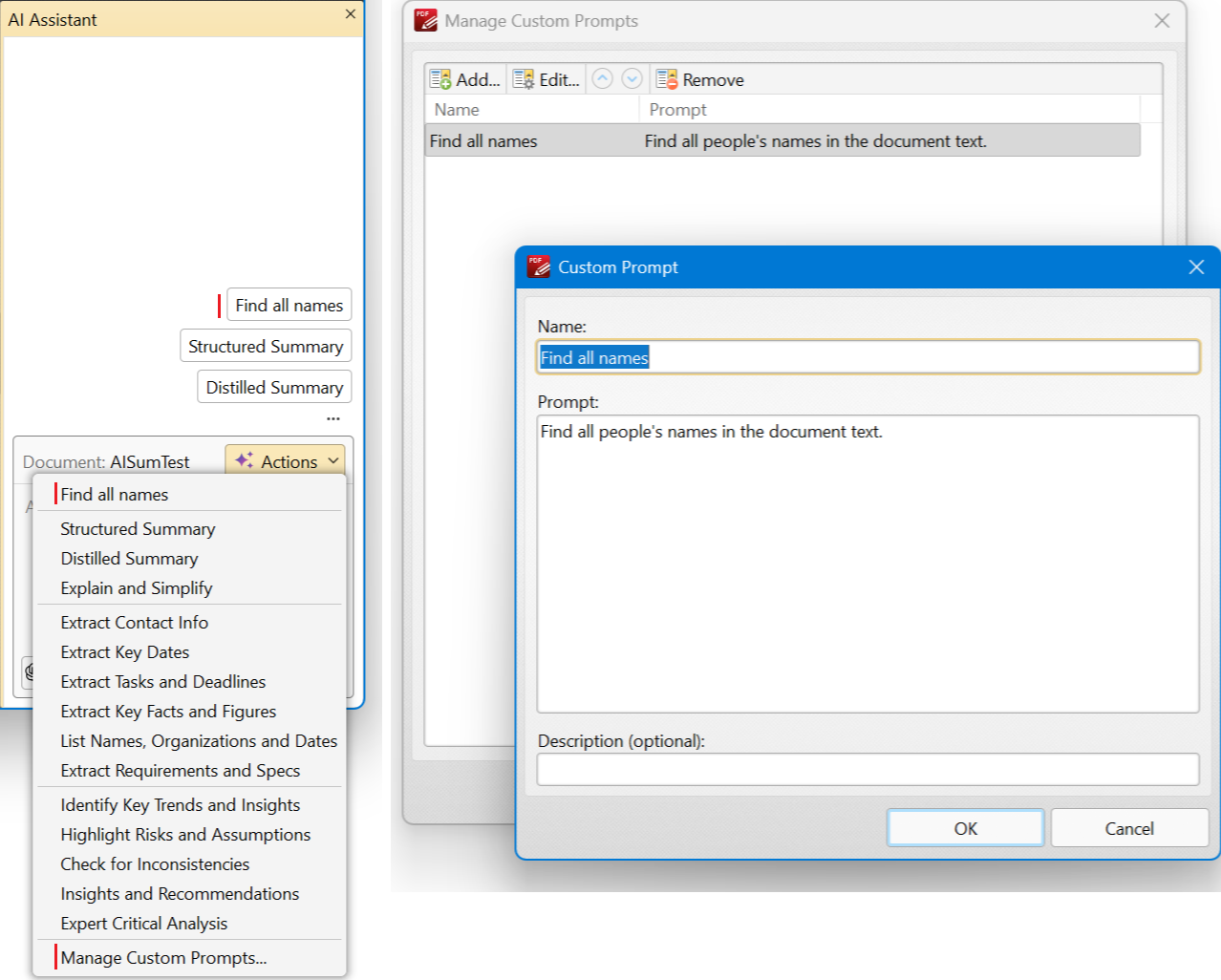
NEW AI Assistant: added an option for users to add custom prompts.
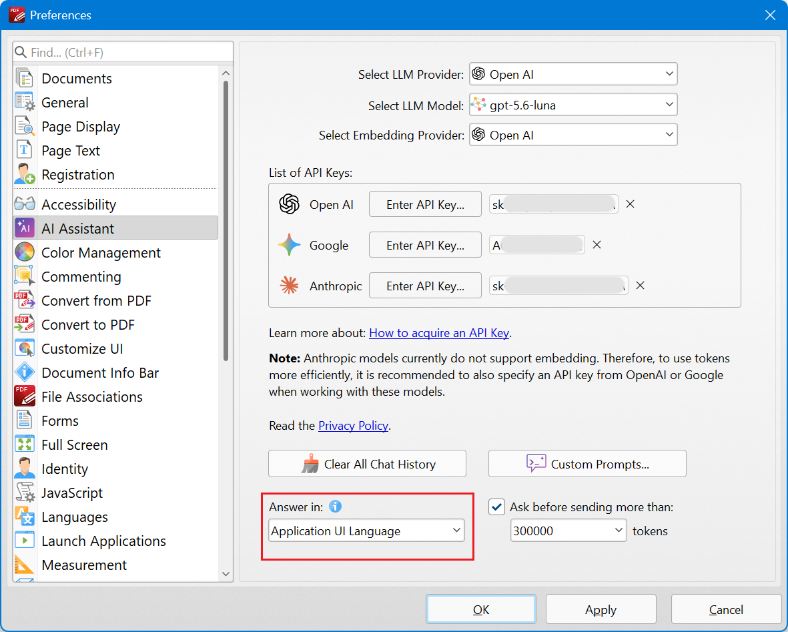
NEW AI Assistant: added an option to specify the language in which the AI should answer questions.
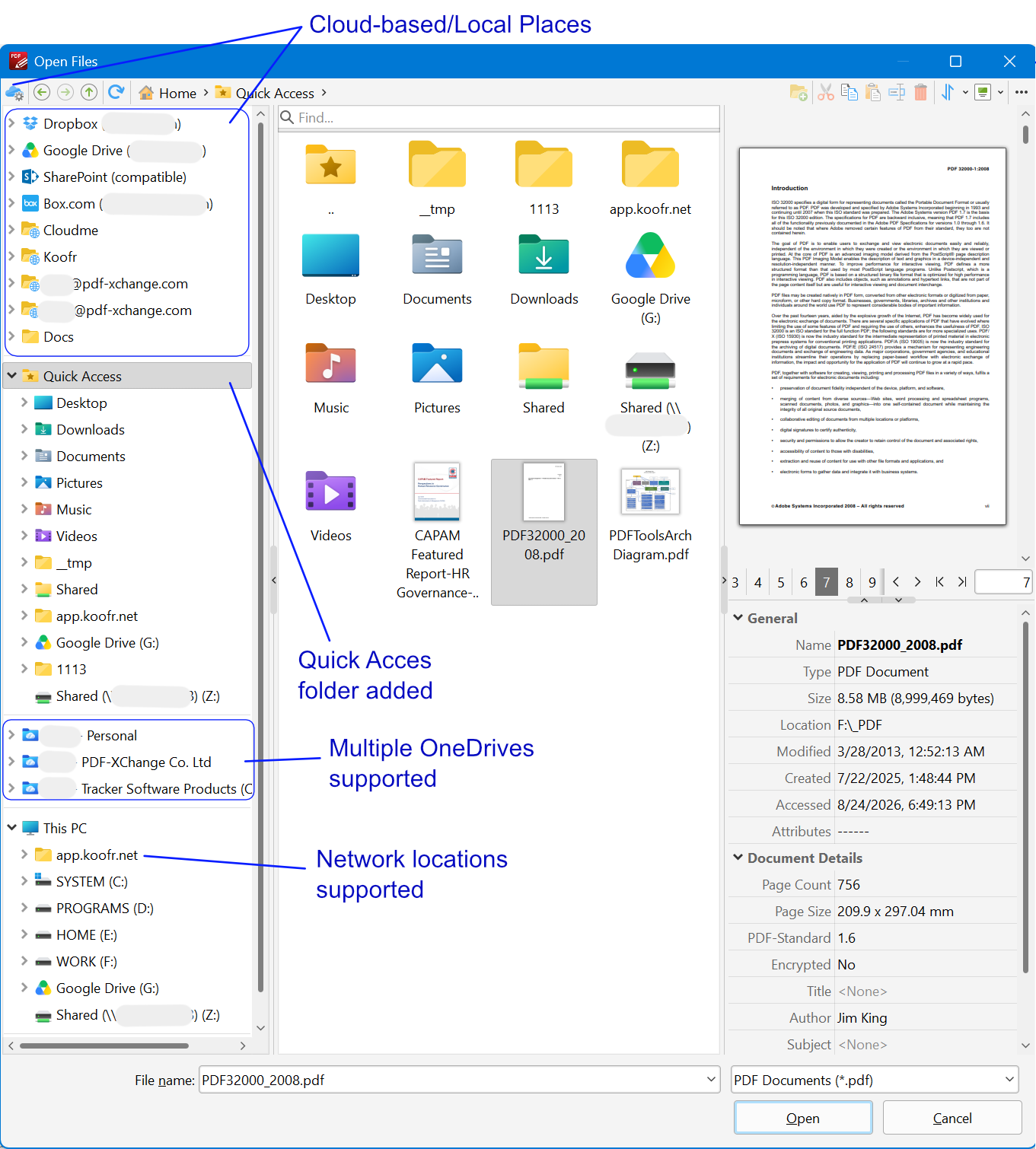
NEW New Open/Save File dialog box: added support for multiple OneDrive-folders and Network Locations, and added a 'Quick Access' folder.
NEW Added a 'Use system title and frame' option (Preferences > General > Tabs & Windows) to turn on/off the use of the system's title and border for the main window. This option can also help solve a possible problem under WINE where the system title may sometimes overlap the application's custom title.
NEW Added a 'Relationship' column to the attachments pane. (T# 7748) (48980)
NEW Implemented handling of the fill_tab property in JS dialogs. (50011)
NEW Added Brotli compression as an option when recompressing images, and for performing some other operations.
Bug fixes and other updates/enhancements:
-
Fixed the "Error [AFSLib]: File cache for specified file already exists" error that may sometimes appear when a user opens a file from a cloud-based "Place" using the new Open File dialog box.
-
Fixed an issue with saving a document when the destination file is located on a special cloud-based document management system such as CenterDevice.
-
Fixed rare issue with crashes on some documents during rendering. (T# 7845)
-
Fixed "Convert Text Files to PDF" for specific encodings. (49334)
-
Improved the accuracy of the stroke colour description for link annotations when this property is not specified in the structure. (T# 7896) (49815)
-
Fixed an issue with layers not merging correctly. (T# 7888)
-
Fixed an issue with applying the thickness value to Text Markup comments during import, and added support for exporting and importing rounded-corner radius values for Rectangle comments. (T# 7853) (49661)
-
Fixed an issue where JavaScript related to AcroForms in stamps was not updated after saving. (T# 7844) (49609)
-
Fixed an issue with dimming and overlapping in the Highlight Destination function. (T# 7903) (49991)
-
Fixed an issue with excluding UI-commands from the 'Quick Launch' dropdown and 'Customize Toolbars > Commands' dialog box when they are disabled by Group Policy.
-
Fixed an issue with missing thousands separators for file sizes in the "details" view of the new Open/Save dialog box. (49791)
-
Fixed an infrequent 'not enough permissions' issue when saving documents after previewing them in the new Open/Save File dialog box if opened from cloud-based places.
-
Fixed crashes on File Open under Wine (Linux). (49752)
-
Fixed issues with using the MS Office Click-to-Run products (including Microsoft 365 and Office 2019/2021) inside the Office-to-PDF features. On some systems such features may not work.
-
Fixed an issue with setting labels for measurement comments by applying corresponding comment styles that already contain custom labels.
-
Find/Search: fixed an issue with the 'Clear' item in the dropdown list. Now it is not selectable by keyboard/auto-complete/mouse-wheel, but only by mouse. Also, the auto-complete feature there is now case-sensitive.
-
Fixed some issues with the system's Narrator screen reader app, including it being unable to read text labels on dialog boxes.
-
Fixed an issue with the creation date in PDF/A files.
-
Fixed issues with the incorrect filtering of annotations. (43529)
-
Fixed issues with rendering text in text annotations with white text.
-
Fixed an issue where PDF documents converted from MS Word could have black areas.
-
Fixed an issue with handling the percent character in macro strings. (49748)
-
Fixed issues with text rendering in some specific cases. (T# 4061, 4957, 7871)
-
Improved handling of align_fill in JS dialogs. (T# 7897) (49847)
-
Fixed a rare case of a possible crash during color conversion in some documents. (T# 7885)
-
Fixed the incorrect appearance of "down" push button form fields that have icons. (50006)
-
Fixed potential issues when signing documents with certificates that use the ECDSA-SHA384 algorithm.
-
Fixed an issue where some selected page content was not copied to the clipboard.
-
DocuSign: signatures saved in the user's DocuSign account are now available when signing documents in PDF-XChange Editor. (50063)
-
Changed text encoding detection for text files. (49328)
-
Added Recents and Favorites groups to the Stamps pane. (T# 4335)
-
Added the ability to recolour stamps. (T# 7764) (49059)
-
Added support for letters in the auto-incrementing interactive field of the “Create Custom Stamp” feature. (T# 7904)
-
Upgraded the Markdown plugin to use a new engine, providing full CSS support and support for LaTeX formulas.
-
Added the ability to search for layers by name. (T# 6644) (40856)
-
Added the “Open new files within the active virtual desktop” option (enabled by default) and made other improvements to virtual desktop handling. (T# 7872)
-
Added support for selecting pages related to Watermark/Background/Header & Footer/Bates Numbering settings. (T# 7858) (49729)
-
Added an option to prevent the text in a comment pop-up from scrolling to the end when the pop-up is opened. (T# 7488)
-
Added the ability to focus the selected page number range when opening the Page Numbering dialog box. (T# 7753) (49017)
-
Added a highlight indicator to the currently active profile in the "Set scale" dropdown menu. (T# 7719)
-
Fixed an issue with the 'Text Correction' tool. Closing the insert/replace comment popup by pressing Esc now returns the text cursor to the InsertText-annotation position.
-
Improved the 'Identify Forms' tool.
-
Improved document loading time, especially for documents that contain a dictionary object with many entries.
PDF-Tools
NEW Added an option to control the behavior of the on-screen keyboard on touch devices (Preferences > General > Show the Touch Keyboard).
NEW Added an option to the 'Export Form Data' action that adds a filename column to the output CSV file.
Bug fixes and other updates/enhancements:
-
Fixed an issue where the Sign Document action showed a stub document preview instead of the document being processed during a tool run.
-
Fixed an issue that allowed Application Variables with duplicate names to be created. (49857)
-
Fixed the behavior of methods in the 'Apply Metadata Template' functionality of the 'Change Document Properties' action. (49782)
PDF-XChange Printer Standard
NEW Added options to enable Brotli compression for images and content compression.